Everything You Need to Run a Private Cloud
Compute, storage, networking, backup, insights, automation and security. One platform, one console, one API.

Nine Capabilities, One Platform
Compute
Instances, images, snapshots, HA
Explore →Balancing
Even load, placement, evacuation
Explore →Storage
NFS, FC, iSCSI, distributed
Explore →Networking
VLANs, SDN, IPAM
Explore →Backup
Policies and self-service restore
Explore →Insights
Scores, forecasts, right-sizing
Explore →Automation
Schedules, workflows, API
Explore →Self-Service
Virtual datacenters and catalog
Explore →Security
SSO, roles, approvals, audit
Explore →Take a Look Around
Real screens from the CognixStack console. Drag the slider to compare the dark and light themes.
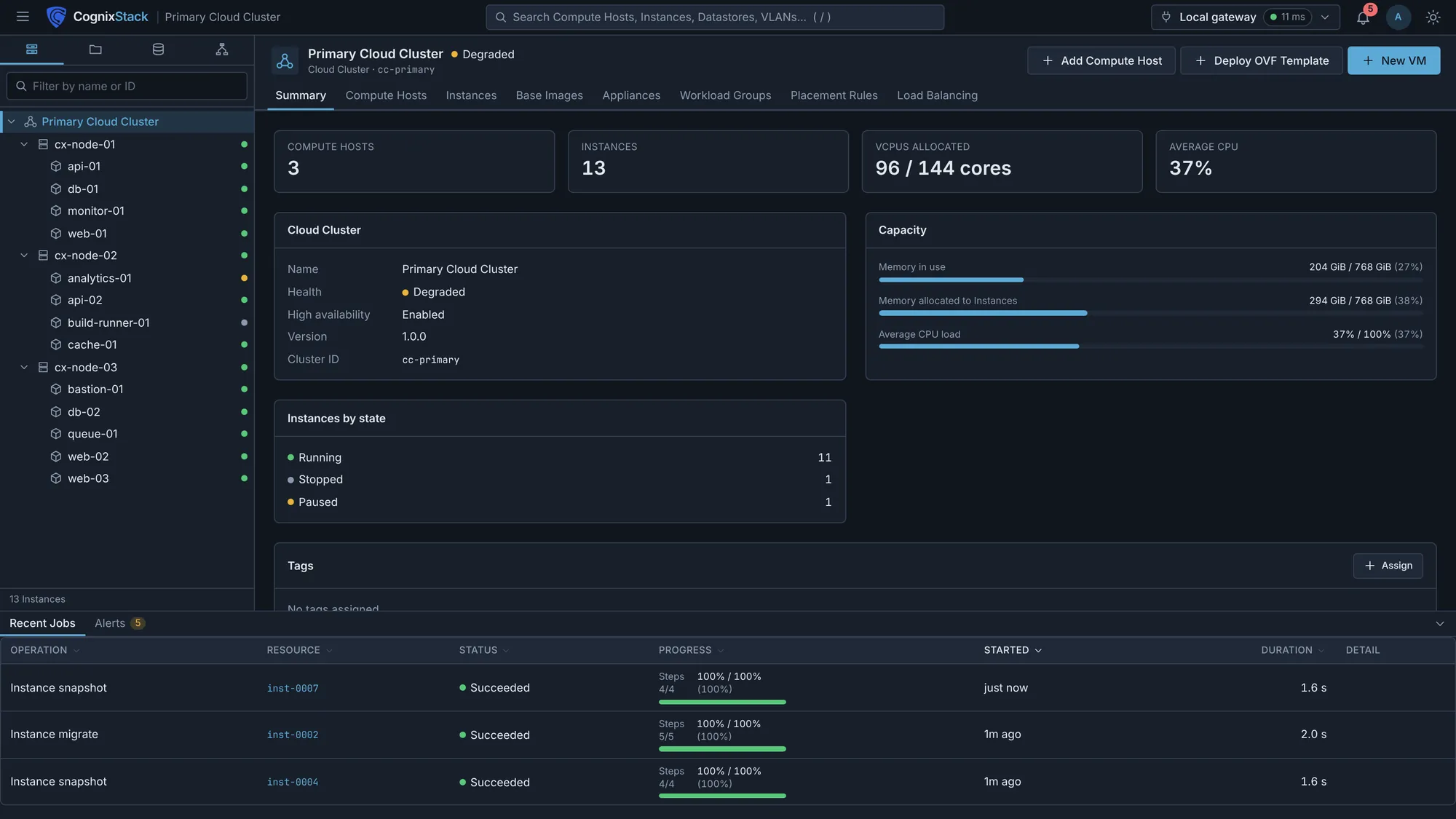
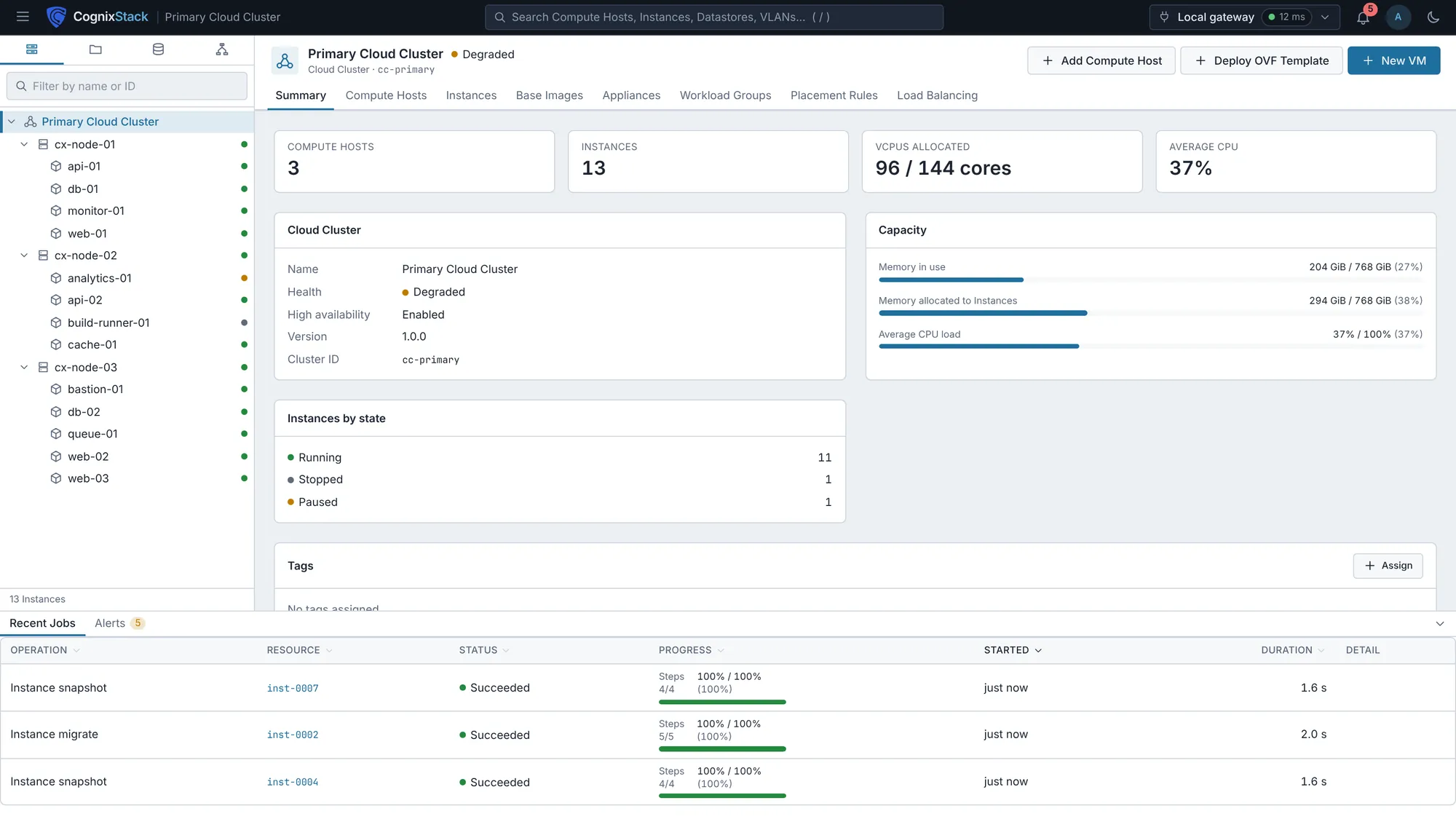
Cluster summary ·
Screens from a lab environment running the built-in simulation.
The Full Instance Lifecycle
Create, run, protect and retire VMs across every cluster.
- InstancesPower, resize, clone, migrate
- Golden imagesCloud-init ready templates
- SnapshotsPoint-in-time, one click
- AppliancesOVF/OVA in and out
- High availabilityRestart on healthy hosts
- TagsSearch and automate by label
Hosts Evenly Loaded, Automatically
Steady performance and painless maintenance, without moving VMs by hand.
- Load balancingManual or automatic moves
- Tunable thresholdsConservative to aggressive
- Placement rulesTogether, apart or pinned
- EvacuationMaintenance in one step
Move api-01 node-01 → node-03
Use the Storage You Already Own
Every datastore type, managed and forecast from one place.
- NFS, FC and iSCSIPlus shared and distributed
- LUNs to datastoresCreated as tracked jobs
- Capacity forecastsKnow before you run out
- QoS tiersQuotas per tenant
Isolated Networks for Every Team
From classic VLANs to software-defined virtual networks.
- VLANs and bridgesManaged per host
- SDN zonesVirtual networks per tenant
- IP managementSubnets and IPAM
- Safe topologySegments never merge
Protection Built In, Not Bolted On
Every workload covered by policy. Every team able to restore its own.
- Backup policiesSchedules and retention
- Isolated namespacesPer-tenant credentials
- Self-service restoreNo ticket needed
- Nightly reportsGaps flagged in Operations
Answers, Not Just Dashboards
Scores, forecasts and recommendations from your own metrics.
- Health, risk, efficiencyWith the reasons why
- Capacity forecastingTime left and N+1 headroom
- What-if planningTest before you buy
- Right-sizingFit VMs to real usage
- ReclamationFind idle capacity
- AlarmsEmail, chat or ticket
Let Routine Work Run Itself
Recurring operations on a schedule, and an open API for everything else.
- Workflows and playbooksMulti-step operations
- Scheduled tasksHourly, daily or weekly
- Target by tagResolved at every run
- REST APISame API as the console
{ "action": "restart" } → 202 job queued
A Cloud Experience for Every Team
Virtual datacenters with guardrails you set.
- Virtual datacentersCompute, network, backup
- Quotas checked firstBefore anything deploys
- Service catalogApproved images and sizes
- Usage and chargebackReady for showback
Least Privilege, Everywhere
Fine-grained control over who can do what, with every action recorded.
- Single sign-on + MFAAD, LDAP, Entra ID
- Custom rolesBuilt from privileges
- Per-object permissionsInherited down the tree
- ApprovalsSecond person for risky changes
- Audit trailBefore and after, always
- Policies and tokensPasswords, sessions, API
Watch One Change Travel Through CognixStack
Every action is checked, approved where it matters, tracked step by step and recorded. Try it in the console below.
- 1RequestConsole, catalog or API
- 2Policy checkQuotas and rules
- 3ApprovalSecond person for risky changes
- 4QueuedJob created
- 5ExecuteHypervisor API call
- 6TrackStep by step, with retries
- 7RecordAudit event, before and after
 CognixStack
Search Compute Hosts, Instances, Datastores, VLANs… ( / )
Local Lab
| Name | State | Host | Action |
|---|
Try an action: restart runs straight away; migrate and delete need a second approver (you).
| Operation | Resource | Status | Progress | ||
|---|---|---|---|---|---|
| No jobs yet. Actions you run appear here. | |||||
| Time | Description | Object | Status | By |
|---|---|---|---|---|
| The audit trail of every change appears here. | ||||
Approval Required
This change needs a second person. In this demo, you're the approver.
- Action
- Instance
- Requested by
- alex@ops
- Approver
- sam@ops (you)
Your Team's Skills Carry Straight Over
Teams coming from vCenter keep the same hierarchy, objects and workflows. Only the names change, and training takes days rather than months.
| If you know… | In CognixStack |
|---|---|
| vCenter Server | CognixStack Console |
| ESXi host | Compute Host |
| Virtual machine | Instance |
| VM template | Base Image |
| Resource pool | Workload Group |
| DRS rules and balancing | Placement Rules · Load Balancing |
Runs in Your Datacenter, Supported from Ours
CognixStack sits beside your clusters and manages them through their APIs. Our operations team connects over a secure tunnel your site opens.
Your Datacenter
CognixStack Operations
- Nothing installed on your hypervisors
- No inbound ports to open
- Keeps running if the link drops
- Every action in the audit log
Walk Through Your Day-to-Day in the Console
Our engineers show the features that matter to you, or connect a lab cluster so you can watch it come to life in minutes.